In the dynamic world of paid media, remarketing lists remain an indispensable tool for enhancing PPC performance, particularly within search campaigns. These lists empower advertisers with precise control over ad visibility, bid adjustments, and message alignment based on previous user interactions. As privacy regulations tighten and audience signals become less granular, first-party data is increasingly critical for daily campaign effectiveness. Remarketing allows businesses to act on concrete user behavior rather than relying solely on inferred intent or broad audience definitions.
However, many accounts fail to fully leverage these powerful tools, often creating lists only to add them for observation and then largely neglect them. Without a clear strategic purpose for bidding, exclusions, or tailored messaging, remarketing's full potential goes untapped. This article outlines ten practical remarketing list strategies designed to directly influence PPC decisions, supporting users throughout the marketing funnel and reflecting realistic account management, not just theoretical ideals.
Top-of-Funnel & Awareness Remarketing Strategies
These three strategies focus on top-of-funnel marketing, leveraging various campaign types to maximize the impact of your remarketing lists.
1. Target Users Who Have Engaged With A Video Campaign And Encourage Them To Take Action
If you've experimented with YouTube Ads but struggled to quantify their success, this strategy offers a solution. While YouTube ads excel at building product, service, or brand awareness, converting that initial touchpoint into action requires a strategic approach – precisely where remarketing lists come in.
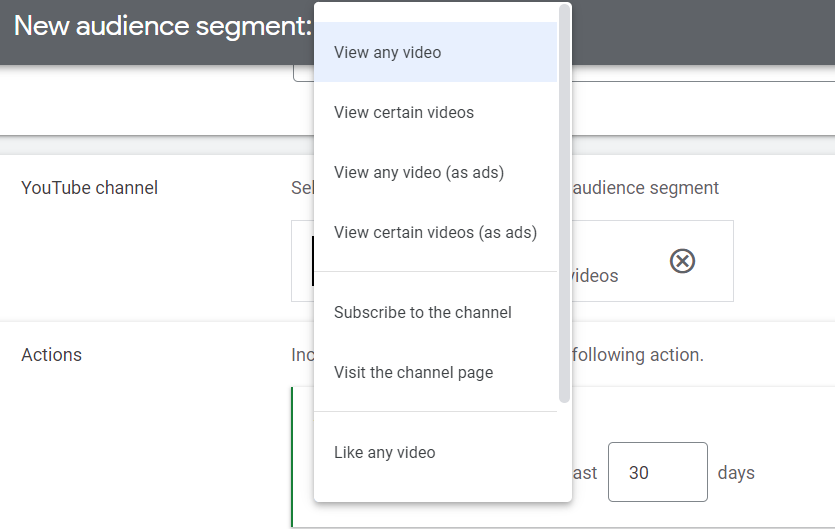
Google Ads allows you to create different types of remarketing lists based on your YouTube videos. There are two key requirements for using this list type:
- These lists can only be used in other YouTube or Search campaigns – not Display.
- Your YouTube channel must be linked to your Google Ads account.
To set up YouTube remarketing lists, navigate to Tools > Shared Library > Audience Manager in Google Ads. From there, click the “+” button to begin segmenting your YouTube audiences.

Google provides numerous options to leverage YouTube video engagement for remarketing, including interactions like:
- Video views
- Channel subscriptions
- Channel visits
- Video likes
- Playlist additions
- Video shares
Furthermore, you can segment these options to make your remarketing lists as specific as possible: