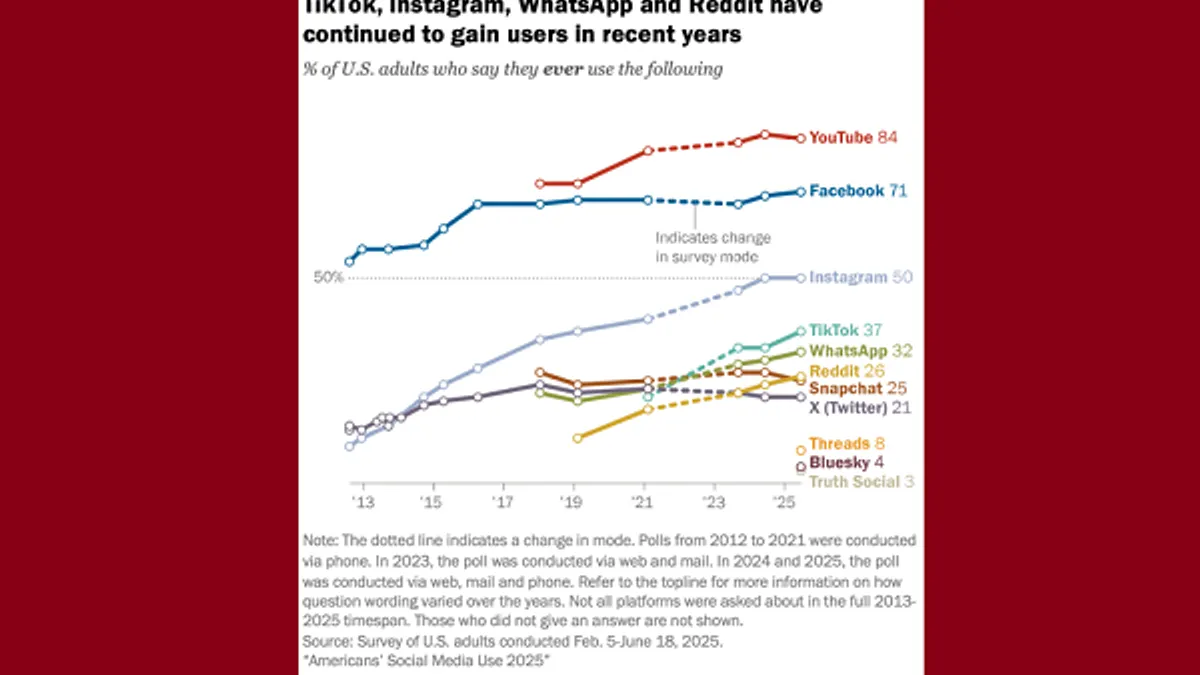
In the wake of significant changes at Twitter (now X) following Elon Musk's acquisition, millions of users sought alternatives, leading to a surge in popularity for platforms like Mastodon. While other microblogging sites such as Bluesky and Instagram's Threads have emerged, Mastodon, founded in 2016, had years to cultivate its distinct identity as more than just a temporary refuge. This guide provides a comprehensive overview of Mastodon, the open-source, decentralized social media platform.
What is Mastodon?
Mastodon was founded in 2016 by German software developer Eugen Rochko. Unlike corporate social media giants such as Twitter, Facebook, or Reddit, Mastodon operates as a nonprofit organization. Its primary goal is to benefit the public rather than generate profit for shareholders, shaping its unique approach to social networking.
While Mastodon may initially resemble a Twitter clone, its underlying system is far more intricate. The service is decentralized, operating as a "federated network" similar to email. When you create an account, you choose a server—much like selecting an email provider like Gmail or Yahoo. This choice determines your profile's address, for example, @[your username]@climatejustice.social if you join a climate justice server. Regardless of your chosen server, you can communicate with users across any other server, just as email users can exchange messages between different providers. However, some servers may block others, limiting communication with users from those specific blocked communities.
Understanding Mastodon's Structure: Instances and the Fediverse
On Mastodon, individual communities are commonly referred to as "instances" or servers. These servers are independently run by individuals, groups, or organizations, each establishing its own rules for user registration and content moderation policies. Some servers are open to everyone, while others require invitations or admin approval. For instance, a server for professional scientists might ask applicants to provide links to their research to verify their credentials.
Choosing a server might seem daunting at first, but it's important to remember that you can always move your account later. Furthermore, you can follow users regardless of which server they are on.
Mastodon is also a part of the "Fediverse," an interconnected web of various social media services. Unlike traditional platforms where your account is confined to a single service (e.g., a Twitter account doesn't work on Instagram), your Mastodon account can grant you access to other decentralized social networks within the Fediverse, offering broader connectivity.
Mastodon Lingo and Features
While older third-party clients might refer to Mastodon's equivalent of tweets as "toots," the term is gradually fading, with most users now simply calling them "posts." Mastodon supports many familiar microblogging conventions, including replies, boosts (similar to retweets), favorites, bookmarks, and hashtags. Initially, Mastodon intentionally avoided a quote-tweet-like feature to prevent "dogpiling" criticism, but the platform eventually introduced this functionality in 2025.
There are some subtle differences in features: Mastodon lists only allow you to add people you already follow. Direct messages on Mastodon are essentially @username posts; they are not private messages that go into a separate inbox. To ensure privacy, users must remember to adjust the visibility settings for these messages.
What Does it Mean That Mastodon is Open Source?
Being open source means that anyone can download, modify, and install Mastodon's software on their own server. The platform's developers do not hold exclusive copyright. However, this doesn't mean the code can be used without attribution. For example, former President Donald Trump's social media platform, Truth Social, initially launched using Mastodon's code and presented it as original software, which Mastodon did not approve of.
Getting Started: Creating a Mastodon Account
To create a Mastodon account, visit the Mastodon website and click "create account." You'll be directed to a page listing various servers, which you can filter by region, language, topic, and sign-up speed. Choose a server that aligns with your interests; if it requires approval, you might need to wait. Once registered, you can immediately start finding and following people, regardless of their server affiliation.
To simplify the onboarding process for new users, especially during the "Twitter exodus," Mastodon updated its sign-up flow in 2023. Now, users have an easy option to create an account directly on mastodon.social without needing to choose a specific server immediately.
Choosing Your Mastodon Server
Mastodon's website offers helpful resources for server selection, though the sheer number of options can still feel overwhelming. A good starting point is to ask friends already on Mastodon for recommendations. Alternatively, you can join any server and, as you become more familiar with the platform, change your server affiliation later if desired.
Interacting Across Mastodon Servers
Yes, you can absolutely follow users and reply to their posts even if they are on a different server than yours. However, the process differs slightly from X. To follow someone on another server, you must first enter their full username (e.g., @[email protected]) into the search box on your own server to locate them, then click follow. You cannot simply visit their profile and click a follow button directly.
Understanding Your Timelines: Home, Local, and Federated
Mastodon offers distinct timelines to help you navigate content:
- Home timeline: Displays posts from all the people you follow, similar to X's main feed.
- Local timeline: Shows posts from all users within your specific server.
- Federated timeline: Presents all public posts from users that people on your server follow, offering a broader view of the Fediverse.
For those who find the Federated timeline overwhelming, a "Slow Mode" can be enabled in Preferences > Appearance, which hides timeline updates behind a click.
Mastodon's Moderation Policy
Moderation on Mastodon is decentralized. Each individual server admin sets and enforces their own moderation policies. Therefore, it is crucial to review the policy of any server you consider joining to ensure it aligns with your personal values and expectations for online conduct.
Mastodon vs. X (Formerly Twitter): Pros and Cons
Drawbacks of Mastodon Compared to X:
- Smaller User Base: As of summer 2025, Mastodon has under one million monthly active users and around 10 million registered users, significantly smaller than X's estimated 132 million daily active users.
- Less Intuitive Navigation: Mastodon's decentralized nature can make it less straightforward to navigate for users accustomed to the centralized design of platforms like X. However, this could improve as more developers contribute to the project.
Benefits of Mastodon Compared to X:
- Independent Ownership: Mastodon is not owned by Elon Musk, appealing to users seeking an alternative to X's current direction.
- Customization and Community Focus: Its decentralized structure allows for greater customization. Individual communities (servers) have distinct content guidelines, fostering a variety of user experiences.
- More Personal Interactions: The smaller user base can lead to more personal and direct conversations, often feeling less like "tweeting into the void."
Is Mastodon Safer Than X?
Mastodon's safety largely depends on your choices. Its decentralized nature allows you to select a server with stricter rules against harassment, providing a more controlled online environment. Some features are also designed to mitigate harassment; for example, you can only search by hashtag, not by arbitrary words within a post. This means if you want your content to be discoverable, you must tag it, giving users more control over their post's visibility. However, a text-based search can still surface posts you've written, favorited, boosted, or been mentioned in, which can be useful for personal tracking.
Media Support on Mastodon
Mastodon supports various media types, though its capabilities are more limited than X. While X supports a wide array of media and data, including audio-only "Spaces," photos, video, GIFs, polls, and location, Mastodon primarily supports images, videos, audio, and polls.
- You can add up to four images per post, with a maximum size of eight megabytes.
- Video and audio can be of any length, but are limited to a file size of 40 megabytes.
Posting Privately to Friends
Mastodon allows you to set the privacy level of your posts at the time of writing. Posts can be:
- Public: Visible to everyone.
- Unlisted: Public but excluded from discovery features.
- Followers-only: Visible only to your followers.
- Mentioned users only: Visible only to the specific users you've mentioned in the post.
Verification on Mastodon
Mastodon does not have a universal verification system like X. While some servers may vet user sign-ups, users can "self-verify" by adding links to their Mastodon profile that include a specific attribute (rel="me"). This allows you to prove your identity by linking to other verified online presences.
Some servers also offer unofficial, playful verification. For instance, the mstdn.social server allows users to add blue-and-white checkmarks or other emojis to their display name, mimicking verification purely for aesthetic purposes, similar to X's paid verification but without any official meaning.
Is Mastodon Here to Stay?
With under one million monthly active users and approximately 10 million registered users as of summer 2025, Mastodon remains significantly smaller than X. However, not all social networks are designed for the same purpose. Many users find value in Mastodon's niche communities, such as dedicated servers for TTRPGs, preferring a more focused and less chaotic environment than X. While some may find its decentralized system confusing and opt for X, Bluesky, Threads, or other platforms, Mastodon offers a unique "choose your own adventure" approach to social media.
Cross-Posting from X to Mastodon
Yes, cross-posting from X to Mastodon is possible using third-party tools. These tools typically require authorization for both your X and Mastodon accounts, allowing you to set parameters for which tweets or retweets are cross-posted. Popular options include Moa Party and Mastodon Twitter Crossposter (also available on GitHub).
Finding Your Twitter Friends on Mastodon
Several third-party tools facilitate finding your X friends on Mastodon. Many Mastodon users successfully employ services like Fedifinder, Twitodon, and Debirdify to connect with their contacts.
Does Mastodon Work with Bluesky and Threads?
Mastodon's interoperability varies with other emerging platforms:
- Bluesky: Currently, Mastodon does not work with Bluesky. Bluesky has chosen to develop its own networking protocol rather than adopting ActivityPub, the protocol Mastodon uses. This decision has sparked
Similar News