YouTube is closing out the year with a significant wave of platform enhancements, rolling out its latest feature update designed to empower creators and enrich the viewer experience. These comprehensive updates span various aspects of the platform, from expanding interactive tools like voice replies and Superchat goals to introducing advanced AI-powered creation and moderation capabilities, alongside broader access to its "Create" app and refined community guidelines.
Voice Replies: Fostering Personal Connections
One of the key expansions sees YouTube making its voice replies option available to millions of creators. This feature allows channel managers to respond to comments on their videos using short audio clips, offering a more personal and engaging way to interact with their audience. YouTube has been testing voice replies with select creators since December last year, gradually expanding access throughout the year, and is now making it widely available. This move aims to inject more personality into creator responses and foster deeper engagement within streams.
Enhanced Language Preferences for Auto-Dubbing
YouTube is also introducing a new setting for auto-dubbing, giving users greater control over their viewing experience. Viewers can now set their preferred language options, ensuring that content with original audio in those languages will not be automatically translated, defaulting instead to the original sound. This preference can be updated directly on the web or within the YouTube app, catering to a global audience with diverse language needs.
Content with the original audio and preferred languages will not be translated, and will default to the original audio. Viewers can update their preferred languages on web or in the YouTube app.
YouTube Create App Arrives on iOS
The standalone YouTube Create video editing application, previously exclusive to Android, is now launching for iOS users. This app provides creators with a robust suite of video editing tools, enabling them to produce more professional-looking content directly from their mobile devices. The expansion to iOS offers another powerful option for creators seeking to refine their video production workflow.
Superchat Goals for Vertical Live-streams
To further boost monetization and viewer interaction, YouTube is extending Superchat Goals to vertical live-streams. This feature allows creators to set donation thresholds during live broadcasts, incentivizing viewers with rewards or milestones as they contribute. By integrating this into vertical formats, YouTube aims to provide more live-streamers with an effective tool to drive donations and enhance the interactive nature of their content.
Expanded Channel Guidelines for Community Management
YouTube is making its Channel Guidelines feature accessible to all creators who have intermediate and advanced feature access. This enables channel managers to establish clear rules for conversations within comments, live chats, and community posts, fostering a more positive and respectful environment. Viewers will be prompted with these guidelines the first time they interact on a channel with the feature enabled (on iOS and Android), and the guidelines will also be visible at the top of a video's comment section. Creators can easily set up these rules via YouTube Studio.
Viewers will see Channel Guidelines the first time they post a comment, live chat, or communities post on a channel that has Guidelines enabled on iOS and Android. Additionally, viewers will also see Channel Guidelines at the top of a video's comment section.
Generative AI for Visual Content: "Nano Banana"
Google's latest generative AI model, dubbed "Nano Banana," is being rolled out to YouTube posts. This innovative tool offers creators new ways to generate and edit visual elements, aiming to stimulate community discussion and engagement. With Nano Banana, users can edit images within their YouTube posts to change locations, try on new outfits, switch hairstyles, or even "time travel" to different decades. The AI also allows for easy removal of distracting objects or changes to background colors through simple prompts. Initially, Nano Banana will be available to users over 18 in the U.S., Canada, New Zealand, and India.
With Nano Banana, you can edit images in your YouTube posts to transport yourself to different locations, try on new outfits, switch up hairstyles, or time travel to different decades. You can also remove a distracting object or change a background color by easily adding, removing, or modifying specific elements with just a prompt.
AI-Powered Shorts Suggestions from Long-Form Videos
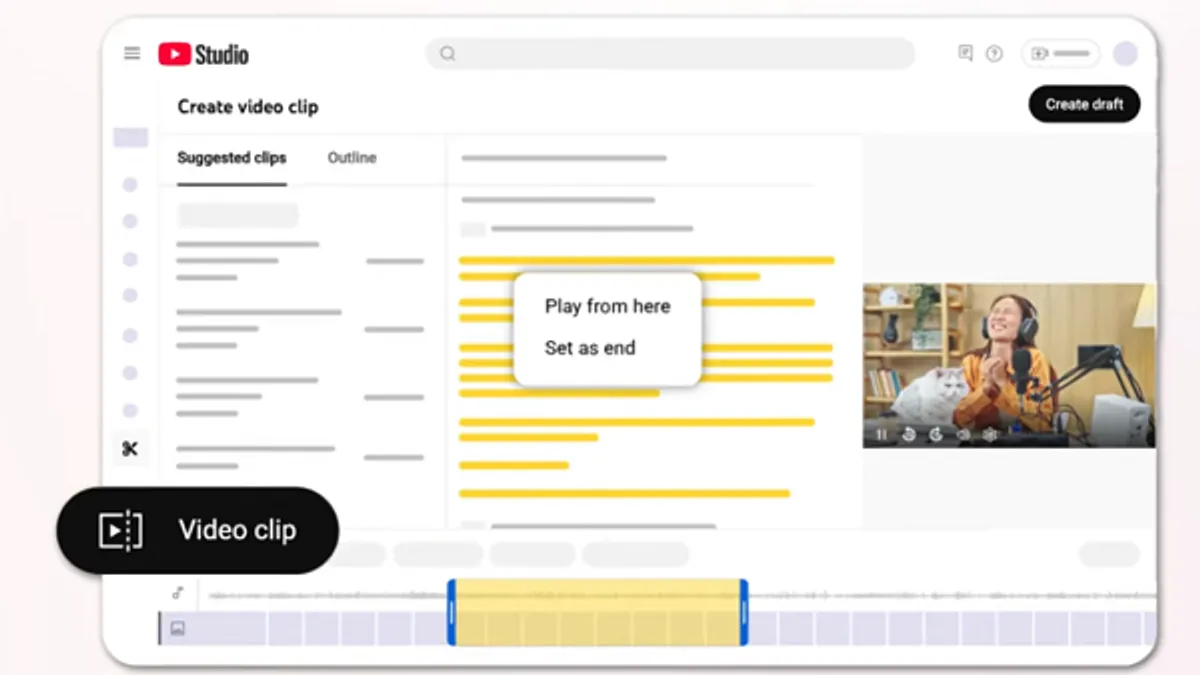
In a move to help creators leverage the popularity of short-form content, YouTube is introducing AI-powered suggested Shorts clips derived from long-form videos. The system will now recommend specific segments from longer content that can be easily repurposed into YouTube Shorts. While this feature is currently limited to videos within a podcast playlist, it presents a valuable opportunity for creators to expand their reach and engagement on the Shorts platform. This option will initially be available to creators in the U.S. and Canada.
Comment Summaries for Quick Insights
Similar to features seen on other platforms, YouTube is launching comment summaries at the top of comment sections for some clips. These AI-generated overviews provide a simplified summary of the main discussion points and key interests within a video's comments. The feature will be turned on by default, requiring users to select "Get summary" to view the overview, offering a quick way to gauge viewer sentiment and common questions.
And if you'd prefer not to see the summary, there's no need to engage with the get summary prompt.
Experimenting with the Dislike Button on Shorts
Finally, YouTube is testing changes to the "Dislike" button on Shorts clips to clarify its purpose and improve the viewing experience. Recognizing that users often conflate "Dislike" and "Not interested," or are unsure of their differences, YouTube is experimenting with merging these functions into a single "thumbs down" icon, accessible via the three-dot menu. In this test, some users will see the icon labeled "Dislike," while others will see "Not Interested." All participants who click the "thumbs down" will receive an optional feedback survey, similar to how "Not Interested" currently functions, providing YouTube with valuable insights into user preferences.
Since launching Shorts, we’ve been listening closely to your feedback on how to improve the viewing experience. We’ve heard that you often use ‘Dislike’ and ‘Not interested’ interchangeably on Shorts, or aren’t sure what the differences are. To address this, and to better match with how people typically interact with short-form video feeds today, we’re experimenting with options where ‘Dislike’ and ‘Not Interested’ are merged into one ‘thumbs down’ icon behind the three dot menu.
All viewers in the experiment who click ‘thumbs down’ on a Short will receive an optional feedback survey, similar to how ‘Not Interested’ works today.
Conclusion
These updates represent YouTube's ongoing commitment to evolving its platform, offering creators more dynamic tools for content creation, community interaction, and monetization. While none of these are revolutionary shifts, they are significant expansions and refinements of existing projects and experiments, collectively enhancing the YouTube ecosystem for both creators and their global audience.